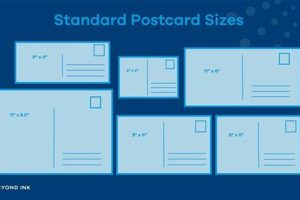
Standard measurements for printed postcards often adhere to a 4×6 inch format (10.16 x 15.24 cm). This size offers a practical balance between displaying a clear image and remaining affordable to produce and mail. Variations exist, including larger “jumbo” postcards, but 4×6 remains the most common. For digital images intended for print at this size, a resolution of 300 dots per inch (DPI) is recommended to ensure sharp, high-quality results. A lower DPI might result in pixelation or blurriness upon printing.
Maintaining the correct proportions is crucial for achieving a professional look and avoiding cropping or distortion. Historically, postcards emerged as a convenient and inexpensive way to communicate visually, and their standardized dimensions contributed to their widespread adoption. Today, despite digital communication, physical postcards remain popular for personal correspondence, marketing, and artistic expression. Appropriate sizing is crucial whether one intends to create postcards from personal photographs, utilize them for business promotion, or send a memorable travel greeting.
Understanding the standard specifications allows for seamless integration into printing workflows, ensuring the final product aligns with expectations. This foundation enables further exploration of related topics, such as paper stock, printing techniques, and design principles for effective visual communication.
Tips for Utilizing Standard Postcard Dimensions
Optimizing images for postcard printing requires careful consideration of standard dimensions. The following tips offer guidance for achieving professional results.
Tip 1: Design with Bleed: Incorporate a bleed area of 1/8 inch (0.3175 cm) beyond the final 4×6 inch dimensions. This ensures that no unprinted white border appears after trimming.
Tip 2: Maintain 300 DPI: A resolution of 300 DPI is essential for sharp, clear prints. Lower resolutions may result in pixelation, particularly when enlarging images.
Tip 3: Preserve Aspect Ratio: Avoid distorting images by maintaining the original aspect ratio. Cropping tools can help achieve the correct proportions without stretching or squeezing.
Tip 4: Choose High-Quality Images: Select images with good lighting, focus, and composition for optimal print results. Images taken with high-resolution cameras are generally preferred.
Tip 5: Verify Printer Specifications: Different printers may have specific requirements. Consulting printer guidelines ensures compatibility and avoids potential issues.
Tip 6: Consider Paper Stock: Paper weight and finish affect the final appearance. Selecting the right paper stock enhances image quality and overall presentation.
Tip 7: Proofread Carefully: Before printing, meticulously review all design elements, including text, images, and layout, to ensure accuracy.
Adhering to these guidelines ensures professional-quality postcards, whether for personal or business use. Careful attention to image resolution, dimensions, and printing best practices contributes significantly to a polished final product.
By understanding these practical considerations, one can effectively leverage standard postcard dimensions for impactful visual communication.
1. Standard

The designation “4×6 inches” represents the most commonly recognized standard for postcard dimensions. This measurement forms the foundation for print production and mailing compatibility, serving as a crucial reference point for both physical and digital postcard creation. Understanding its implications is essential for effective communication through this medium.
- Physical Printing Parameters
Printing machinery and commercially available postcard stock are often calibrated for 4×6 inch dimensions. This standardization simplifies production processes, enabling efficient and cost-effective printing. Deviation from this standard may necessitate custom printing solutions, increasing production complexity and cost.
- Digital Image Preparation
Digital images intended for postcard printing must adhere to the 4×6 inch aspect ratio to avoid cropping or distortion. Image editing software utilizes this standard as a preset, simplifying the resizing and optimization process. Maintaining this ratio ensures the final printed output accurately reflects the intended visual composition.
- Mailing Compatibility
Postal services recognize and process mailpieces within specific size and weight parameters. The 4×6 inch standard falls within these accepted ranges, ensuring seamless handling and delivery. Larger or non-standard sizes may incur additional postage costs or face processing delays.
- Framing and Display
Readily available frames and display accessories cater to standard postcard dimensions. This accessibility facilitates presentation and preservation of postcards. The standardized size simplifies integration into existing display solutions without requiring custom framing.
The 4×6 inch standard acts as a unifying factor across various aspects of postcard creation and utilization, from initial design and printing to final display and preservation. Adhering to this standard ensures optimal compatibility within the established ecosystem of postcard production and handling, maximizing efficiency and visual impact.
2. DPI

The relationship between 300 dots per inch (DPI) and postcard dimensions is fundamental to print quality. DPI signifies image resolutionthe density of pixels within a given area. Standard postcard dimensions, typically 4×6 inches, require a minimum of 300 DPI to achieve acceptable sharpness and clarity upon printing. Lower DPI values result in a noticeable loss of detail, manifesting as pixelation or blurriness, especially when images are enlarged to the 4×6 inch format. This effect stems from the limited number of pixels available to represent the image data; insufficient pixel density compromises the ability to reproduce fine details accurately.
Consider a landscape photograph intended for postcard printing. An image captured at a low DPI might appear acceptable when viewed on a small digital screen, but enlarging it to postcard size without sufficient pixel information stretches the existing pixels, resulting in a blocky, pixelated appearance. Conversely, an image captured or resampled to 300 DPI possesses the necessary pixel density to maintain image integrity during enlargement. This higher resolution ensures smooth transitions between colors and sharp reproduction of fine details, creating a professional-quality print suitable for postcards. Practical applications include printing high-quality photographs, detailed artwork, or text-heavy designs on postcards without compromising visual fidelity.
Maintaining 300 DPI is crucial for achieving professional-grade postcard prints. While higher DPI values can offer marginal improvements, 300 DPI represents the established standard for balancing image quality and file size. Ignoring this requirement often leads to disappointing print results. Therefore, understanding and adhering to the 300 DPI standard is essential for anyone seeking to produce visually appealing and professionally printed postcards.
3. Bleed area
The 1/8 inch bleed area is a critical design element directly related to standard postcard dimensions. It serves as a buffer zone, accommodating slight variations in cutting during the printing process. Without a bleed area, variations could result in a thin white border along the edges of the finished postcard, detracting from the professional appearance.
- Preventing White Borders
Printers use mechanical cutters to trim postcards to their final size. Slight inconsistencies in cutting are inevitable. The bleed area compensates for these variations, ensuring the printed design extends beyond the final cut line. This prevents unsightly white edges from appearing due to minor cutting deviations. Without a bleed, even a small misalignment during trimming can compromise the visual integrity of the postcard.
- Ensuring Background Continuity
For designs extending to the edge of the postcard, the bleed area ensures background colors or images continue seamlessly to the very edge. Without a bleed, a white border might appear if the cut is slightly off, disrupting the visual flow. A bleed guarantees consistent color and image coverage regardless of minor cutting discrepancies, maintaining the intended aesthetic.
- Maintaining Design Integrity
Design elements near the edge of the postcard benefit from the bleed area. It ensures these elements are not inadvertently trimmed off during the cutting process. A bleed provides a safety margin for critical design components near the edges, preserving the overall composition and intended visual message.
- Professional Presentation
A postcard with a clean, finished edge conveys professionalism. The bleed area, while unseen in the final product, plays a crucial role in achieving this polished look. By mitigating the risk of white borders or truncated design elements, the bleed area contributes significantly to the postcard’s overall presentation quality, enhancing its visual impact.
In the context of postcard dimensions, the 1/8 inch bleed area is a non-negotiable technical requirement for professional printing. It ensures design integrity, background continuity, and a polished final appearance, compensating for potential variations in the cutting process and ultimately maximizing the visual appeal of the finished postcard.
4. Aspect Ratio
Maintaining the original aspect ratio is crucial when adapting images to standard postcard dimensions. Aspect ratio refers to the proportional relationship between an image’s width and height. Failing to preserve this ratio during resizing distorts the image, resulting in an unnatural, stretched, or compressed appearance. This distortion compromises the visual integrity of the image and detracts from the overall quality of the postcard.
- Image Integrity
Preserving the original aspect ratio ensures the image’s composition remains faithful to its intended form. Altering the aspect ratio disrupts the balance of elements within the frame, potentially misrepresenting the subject matter. For instance, a panoramic landscape image squeezed to fit standard postcard dimensions would appear unnaturally elongated, losing its intended wide-angle perspective. Maintaining the aspect ratio through cropping or letterboxing preserves the image’s compositional integrity.
- Avoiding Distortion
Stretching or compressing an image to fit a specific size without regard for its original aspect ratio introduces visible distortion. Faces become elongated or flattened, and architectural features appear skewed. This distortion is particularly noticeable in images containing straight lines or recognizable shapes. Adhering to the original aspect ratio avoids these distortions, ensuring the image appears natural and proportionate.
- Professional Presentation
Distorted images convey a lack of attention to detail and detract from the professional appearance of a postcard. Maintaining the original aspect ratio, even if it necessitates cropping or adding letterboxing bars, demonstrates a commitment to visual quality and enhances the overall presentation. A correctly proportioned image conveys professionalism and respect for the viewer.
- Compatibility with Design Elements
When incorporating images into postcard designs, maintaining the original aspect ratio simplifies layout and integration with other design elements. Distorted images are difficult to work with, potentially requiring complex adjustments to surrounding text or graphics. Preserving the aspect ratio ensures the image seamlessly integrates into the overall design, creating a cohesive and visually appealing layout.
In the context of postcard size photo dimensions, maintaining the original aspect ratio is paramount. It ensures image integrity, avoids distortion, enhances professional presentation, and simplifies integration with other design elements. Ultimately, preserving the original aspect ratio contributes significantly to the overall quality and visual impact of the finished postcard.
5. Metric

The metric dimensions 10.16×15.24 cm represent the direct equivalent of the standard 4×6 inch postcard size. This metric measurement provides a standardized reference for international communication and production, ensuring consistency across different regions using the metric system. Understanding this metric equivalent is crucial for accurate file preparation, printing, and compatibility with international postal regulations.
Consider a scenario where a photographer in Europe intends to print postcards featuring their work for distribution in both Europe and North America. Using the metric measurement of 10.16×15.24 cm ensures the printed postcards conform to established size standards regardless of the printing location. Similarly, specifying these dimensions when ordering prints from an international vendor eliminates potential miscommunication and ensures the final product meets the required size specifications. Practical applications extend to digital design software, where setting image dimensions to 10.16×15.24 cm guarantees accurate sizing for print production.
The metric dimension of 10.16×15.24 cm provides a critical bridge between international standards and the established 4×6 inch postcard norm. This understanding facilitates clear communication and ensures consistent sizing across different production environments and geographic locations, promoting efficiency and interoperability within the global print and mail ecosystem.
6. Paper stock

Paper stock selection significantly impacts the final presentation and perceived quality of a postcard, particularly concerning standard dimensions. While the 4×6 inch format remains constant, the choice of paper stock introduces variables that influence the postcard’s texture, weight, finish, and overall aesthetic. These variations affect how the printed image interacts with the paper, influencing color vibrancy, detail sharpness, and overall durability.
Consider a photographer choosing between a glossy and a matte paper stock for printing landscape photographs as postcards. The glossy finish enhances color saturation and creates a vibrant, eye-catching presentation, ideal for showcasing vivid landscapes. However, fingerprints and glare might detract from the viewing experience. Conversely, a matte finish offers a more subdued, classic look, minimizing glare and fingerprints, but potentially reducing color vibrancy. Furthermore, paper weight impacts the postcard’s rigidity and perceived quality. A heavier stock conveys a sense of durability and premium quality, while a lighter stock might feel flimsy and less substantial. The chosen paper stock should complement the image and intended message, enhancing rather than detracting from its impact. For instance, a textured paper stock might suit a rustic or vintage-themed postcard, while a smooth, coated stock better complements modern or minimalist designs.
The interplay between paper stock and standard postcard dimensions underscores the importance of considering both elements in conjunction. Selecting appropriate paper stock enhances the visual impact and perceived quality within the constraints of the standardized format. Ignoring this relationship can compromise the final presentation, undermining the effectiveness of the postcard as a communication medium. Practical applications extend to marketing, where paper stock choices influence brand perception, and personal correspondence, where texture and weight contribute to the tactile and emotional experience.
7. File format
File format selection, specifically JPEG or TIFF, directly influences the quality and printability of images intended for standard postcard dimensions. Choosing the appropriate format ensures compatibility with printing processes and preserves image integrity, crucial for achieving a professional final product. Understanding the characteristics of each format and their implications for print output is essential for effective postcard creation.
- JPEG (Joint Photographic Experts Group)
JPEG employs lossy compression, reducing file size by discarding some image data. This compression can introduce artifacts, especially noticeable in images with sharp transitions or fine details. While suitable for web use or situations where smaller file sizes are paramount, JPEG’s compression can compromise print quality, particularly at standard postcard dimensions where image details are magnified. Choosing a higher JPEG quality setting mitigates these issues but increases file size.
- TIFF (Tagged Image File Format)
TIFF employs lossless compression, preserving all image data without compromising quality. This format is ideal for print applications, especially for postcards, as it maintains image integrity during enlargement. TIFF files, however, are significantly larger than JPEGs, requiring more storage space and potentially longer processing times. This larger file size becomes relevant when handling multiple high-resolution images destined for print reproduction.
- Print Compatibility
Most professional printing services accept both JPEG and TIFF files. However, for optimal quality at standard postcard dimensions, TIFF is generally preferred due to its lossless compression. JPEG, while acceptable, may exhibit compression artifacts upon close inspection, particularly if the image contains fine details or sharp contrasts. Choosing the correct file format ensures compatibility with printing processes and contributes to a higher quality final output.
- Practical Applications
For professional photographers or graphic designers producing high-quality postcards, TIFF offers superior image quality for print. JPEG might suffice for personal projects or situations where file size is a primary concern, but the potential for compression artifacts should be considered. Selecting the appropriate format balances quality considerations with practical limitations like storage space and processing time.
In the context of postcard-size photo dimensions, selecting the appropriate file format, either JPEG or TIFF, significantly impacts the final print quality. TIFF’s lossless compression preserves image integrity, making it the preferred choice for professional printing. While JPEG offers smaller file sizes, its lossy compression introduces the risk of artifacts, especially noticeable at larger print dimensions. Careful consideration of these factors ensures the chosen format aligns with the desired quality and technical requirements of postcard printing.
Frequently Asked Questions
This FAQ section addresses common inquiries regarding appropriate dimensions for postcard printing, ensuring clarity and understanding of relevant specifications.
Question 1: What are the standard dimensions for a postcard?
The most common standard postcard size is 4×6 inches (10.16×15.24 cm). This size conforms to most postal regulations and is readily available for printing services.
Question 2: What resolution (DPI) is recommended for postcard printing?
A resolution of 300 DPI (dots per inch) ensures optimal print quality, preventing pixelation or blurring when images are enlarged to postcard size.
Question 3: What is bleed, and why is it important for postcards?
Bleed refers to an extra 1/8 inch (0.3175 cm) added to each edge of the design. It compensates for slight variations in cutting during the printing process, preventing unwanted white borders.
Question 4: Can images be resized to fit the postcard format?
Resizing is possible, but maintaining the original aspect ratio is crucial to avoid image distortion. Cropping or adding white space (letterboxing) can achieve the correct proportions.
Question 5: Which file formats are suitable for postcard printing?
TIFF (Tagged Image File Format) is generally preferred for professional printing due to its lossless compression, preserving image quality. JPEG is acceptable but might exhibit compression artifacts.
Question 6: What paper stock options are available for postcards?
Various paper stocks, including glossy, matte, and textured finishes, are available. The choice depends on the desired aesthetic and the image being printed. Paper weight also influences the postcard’s perceived quality and durability.
Understanding these fundamental aspects of postcard dimensions ensures optimal print quality and professional presentation. Consistent application of these guidelines contributes to effective visual communication through the postcard medium.
This foundational knowledge prepares for further exploration of design principles, printing techniques, and best practices for creating impactful postcards.
Postcard Size Photo Dimensions
Precise adherence to standard postcard size photo dimensionsspecifically 4×6 inches (10.16×15.24 cm)is paramount for achieving professional print results. Key considerations include maintaining a 300 DPI resolution for optimal clarity, incorporating a 1/8-inch bleed area to avoid trimming errors, and preserving the original aspect ratio to prevent image distortion. Choosing appropriate file formats (TIFF or high-quality JPEG) and paper stock further contributes to the final product’s quality and overall presentation. Understanding these technical specifications empowers effective communication through this tangible medium.
Effective visual communication relies on the seamless integration of content and format. Careful attention to postcard size photo dimensions ensures intended messages are conveyed with clarity and professionalism, maximizing impact and leaving a lasting impression. This meticulous approach elevates the postcard from a simple communication tool to a tangible representation of quality and attention to detail, vital for both personal and professional contexts.